Solo, self-directed — and no team to hide behind
This is self-directed concept work with no client and no team, so everything below is mine end to end:
- Problem framing — naming the six-domain consent problem and scoping the case study down to the scope, preview, approve and undo model underneath it.
- Interaction design — the trust model itself, and the flows that carry it across all six domains.
- Prototype & visual design — the working HTML/CSS prototype, plus the visual system documented under Design System.
- Planning — the 36-story backlog below, staged and prioritized so the model could actually be built in order.
- The research and measurement plans — what I’d test before asking a team to build it, and what would have to be true for it to work.
Thirty-six stories, staged and prioritized
The four flows above are the map. This is what turns them into something a team could actually plan a sprint against — every story staged to where it happens in the product, and prioritized Must (ships first) or Should (follows once the model holds).
| ID | Stage | Story | Priority |
|---|---|---|---|
| U1 | Setup | As a user, I sign up with Google, Apple, or email in under 90 seconds | Must |
| U2 | Setup | As a user, I verify my email before Aime can act on anything, but can explore the app first | Must |
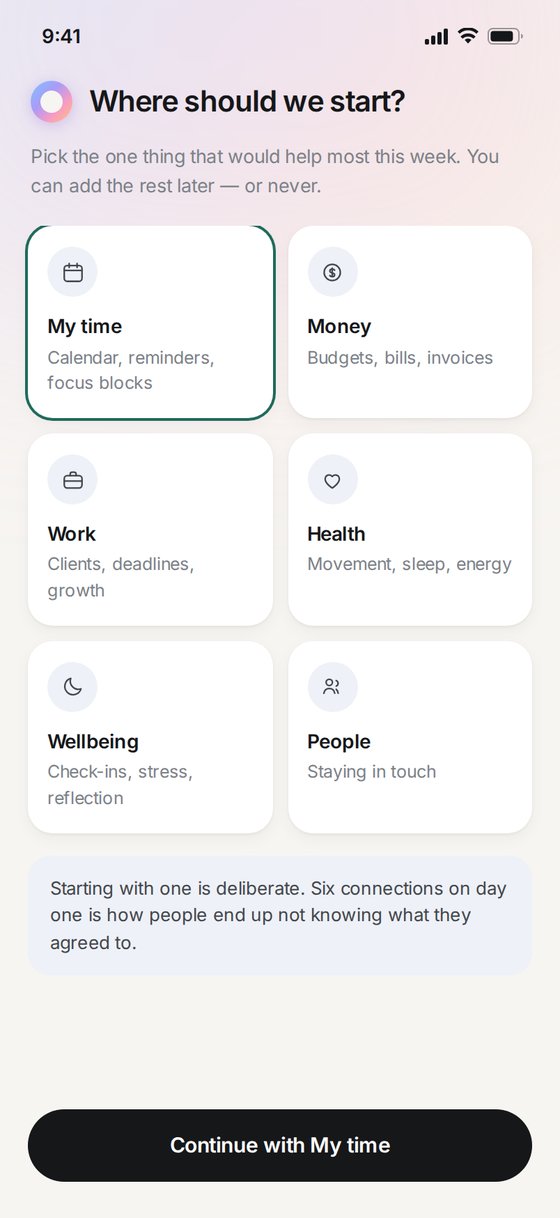
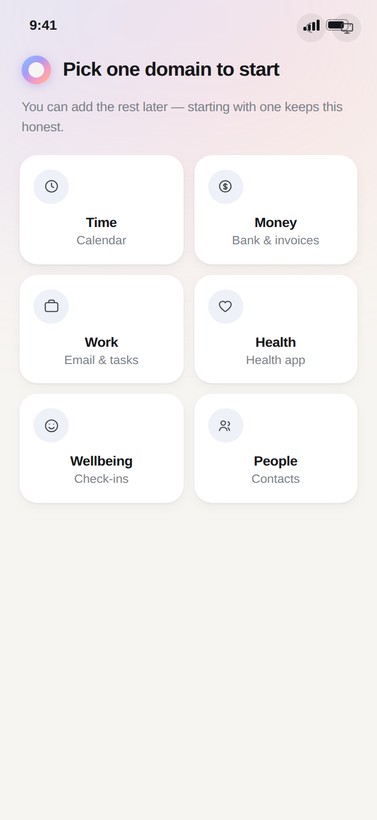
| U3 | Setup | As a user, I pick one domain to start in, not all six at once | Must |
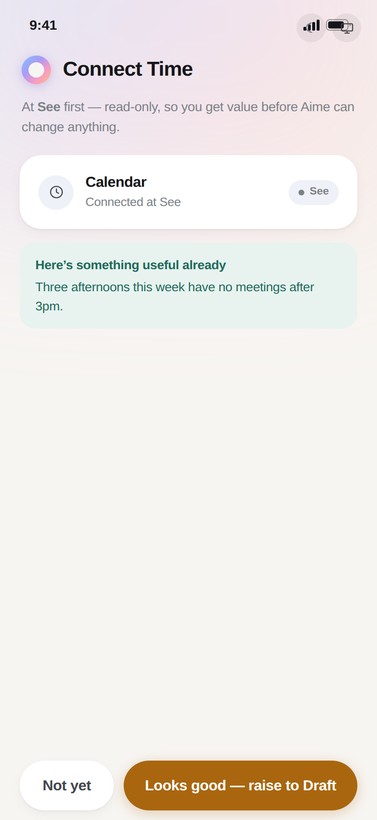
| U4 | Setup | As a user, I connect my first source at See and get a read-only insight before any write access is asked for | Must |
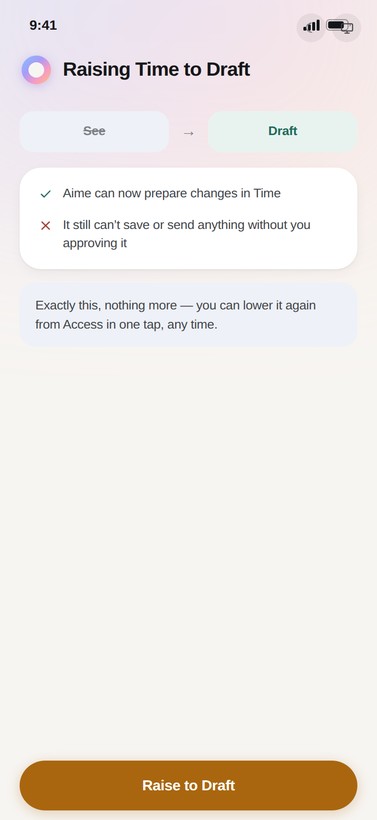
| U5 | Onboarding | As a user, I raise my first scope from See to Draft and understand exactly what changed | Must |
| U6 | Onboarding | As a user, I complete a first approval and see the undo window explained at that exact moment | Must |
| U7 | Onboarding | As a user, I see a one-screen recap of everything I've granted so far, at the end of onboarding | Must |
| U8 | Domains | As a user, I connect Calendar/Email/Banking/Contacts independently, each at its own level | Must |
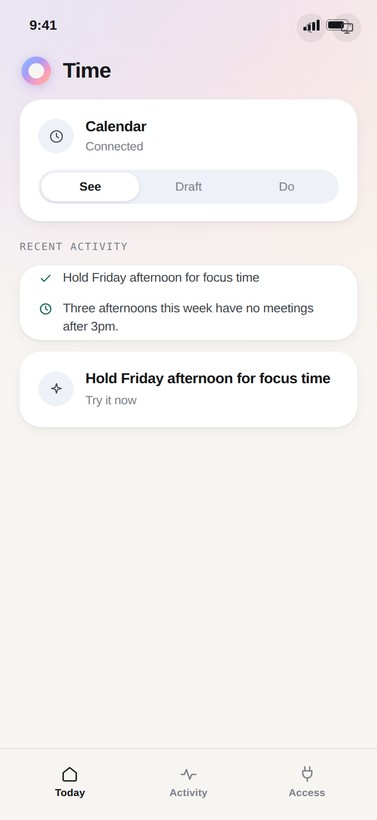
| U9 | Domains | As a user, each domain home shows me its connected sources, current scope, and recent activity in one place | Must |
| U10 | Domains | As a user, Money and Health domains explain why a permission is being asked, not just what it is | Should |
| U11 | Domains | As a user, declining a connection (e.g. banking) shows me a working alternative and its cost, not a dead end | Must |
| U12 | Delegation | As a user, I ask Aime a multi-step request in plain language | Must |
| U13 | Delegation | As a user, I see the whole plan as numbered steps with the exact access each step uses, before approving anything | Must |
| U14 | Delegation | As a user, approving a plan grants task-scoped access that expires automatically when the task ends | Must |
| U15 | Delegation | As a user, if a step needs something the plan didn't cover, Aime stops and asks rather than improvising | Must |
| U16 | Delegation | As a user, when someone else's reply doesn't match the plan, Aime escalates to me instead of deciding for me | Must |
| U17 | Delegation | As a user, I can stop a running task at any point, mid-step | Must |
| U18 | Proactive | As a user, Aime can act alone only within my chosen autonomy level, never past the four fixed guardrails | Must |
| U19 | Proactive | As a user, every autonomous action tells me afterward, with the one line of evidence that triggered it | Must |
| U20 | Proactive | As a user, I get a single "acted alone" banner, not a separate one per domain | Must |
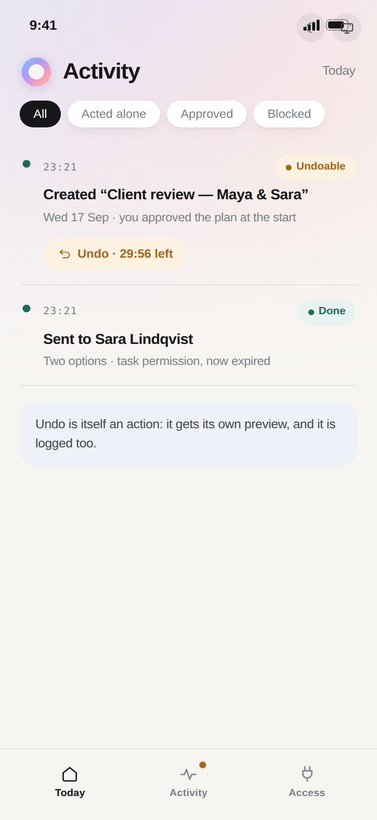
| U21 | Trust repair | As a user, I can find any autonomous action in Activity and see exactly what undoing it will do before I confirm | Must |
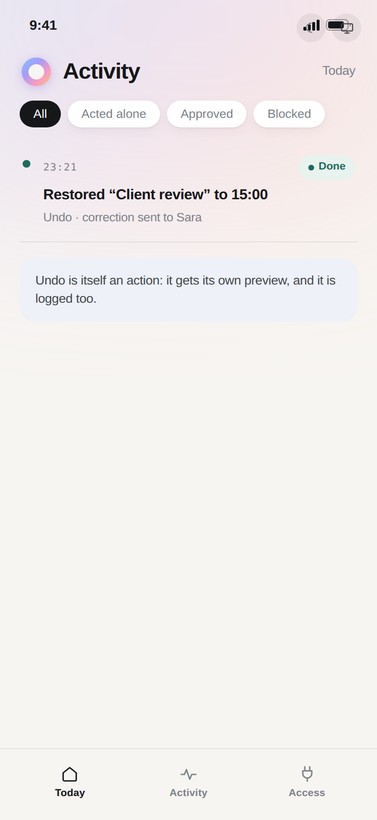
| U22 | Trust repair | As a user, undoing an action logs the reversal as its own entry — it isn't erased from history | Must |
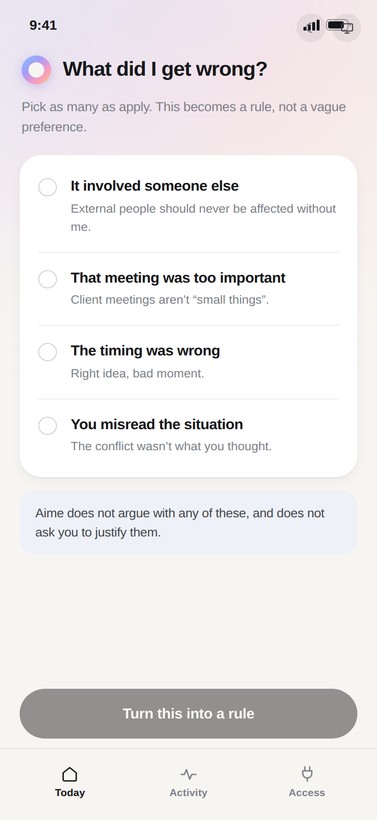
| U23 | Trust repair | As a user, I can turn what went wrong into a rule in my own words, not a canned reason list only | Must |
| U24 | Trust repair | As a user, Aime recommends a scope or autonomy change after a mistake, and the recommendation actually changes something | Must |
| U25 | Trust repair | As a user, choosing "both" pauses autonomy for a fixed period rather than forever, and tells me when it resumes | Should |
| U26 | Access | As a user, I can see every connection, its level, and when it was last used, in one screen | Must |
| U27 | Access | As a user, raising or lowering any single scope never requires touching autonomy, and vice versa | Must |
| U28 | Access | As a user, I can change my one autonomy setting and immediately see it reflected on Today | Must |
| U29 | Access | As a user, revoking a connection entirely takes under 20 seconds from anywhere in the app | Must |
| U30 | Account | As a user, I can enable 2FA (authenticator or passkey) and it's required before connecting Banking | Must |
| U31 | Account | As a user, forgotten-password and account-lockout flows never reveal whether an email exists | Must |
| U32 | Account | As a user, a new-device sign-in emails me immediately with device and location | Must |
| U33 | Settings | As a user, I control notification channels per event type (push/email/in-app), not all-or-nothing | Should |
| U34 | Settings | As a user, I can export my full activity/audit history to a file I keep | Should |
| U35 | Settings | As a user, deleting my account is blocked while any task-scoped access is still open, with a clear reason shown | Must |
| U36 | Settings | As a user, deleting my account offers a data export first, then a 30-day grace period | Must |
32 of the 36 are Must. The trust model doesn’t have a v2 — consent, preview and undo either all ship together, or none of it means anything. The 4 Should items are real but survivable gaps: they make the product more considerate, not more honest.
Six domains, one consent problem
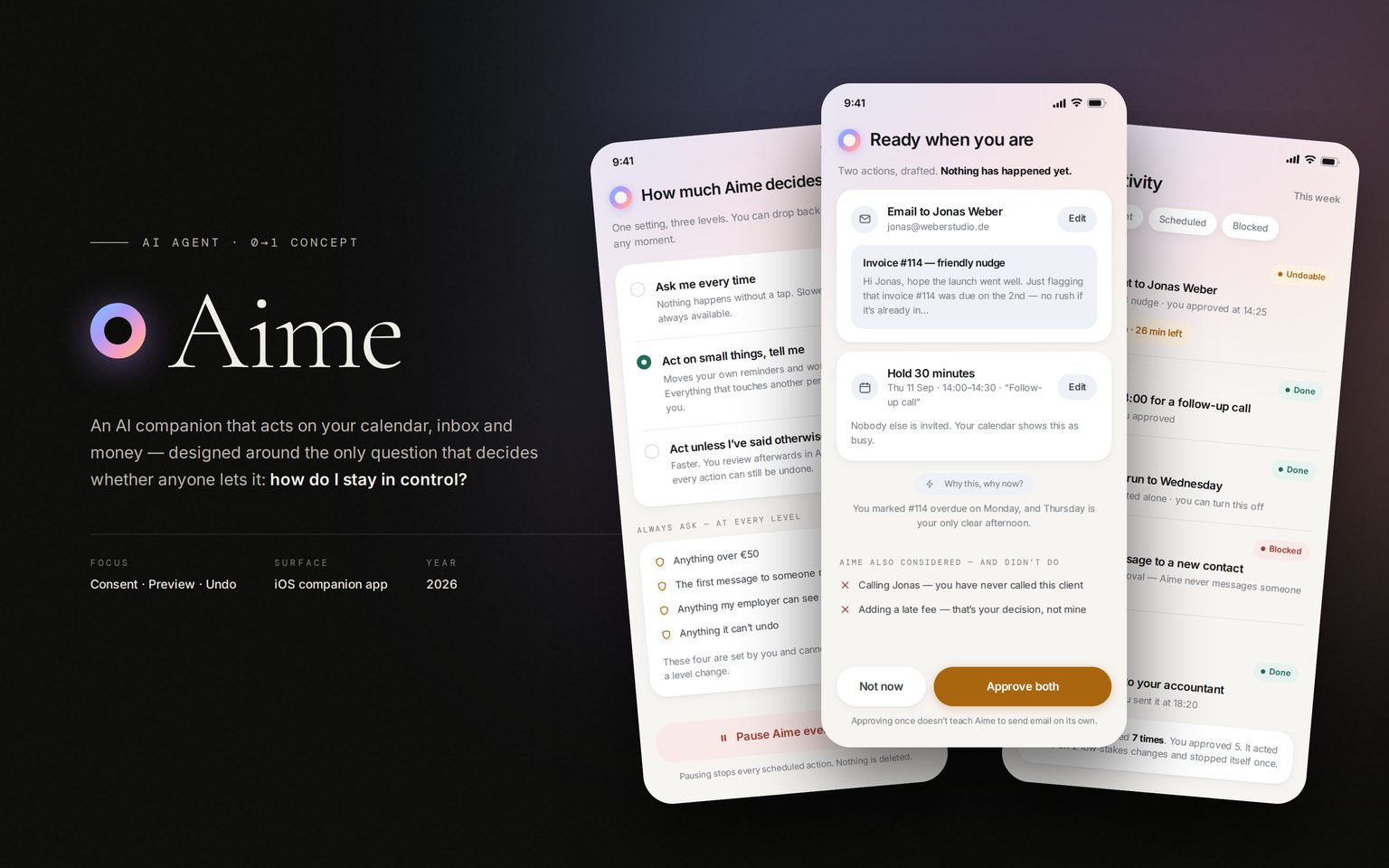
The brief I set myself was one companion across the six areas people currently juggle in six separate apps: tasks, health, work, wellbeing, relationships and money. Plenty of products give advice in those areas. Aime is an agent. It holds your credentials and does things on your accounts.
The six modules, each one a different kind of thing to get wrong — which is why the permission model had to be the same in all of them.
An advisor who gets it wrong wastes a minute. An agent that gets it wrong emails a client, moves a meeting or spends money. So every design question I had turned into the same one: what exactly did I just let it do? People hand over small tasks happily and then stop dead at calendar, inbox and bank. I don’t think that’s because the agent looks incapable. It’s because the power they’re granting is invisible to them.
So I scoped the concept deliberately. Aime keeps all six domains, but the case study is about the layer underneath them: the scope, preview, approve and undo model that every action passes through. That layer is where I spent the time. No amount of warmth in the copy will persuade anyone to connect a bank account if what they’re agreeing to stays vague.
How I’d earn conviction
This is self-directed, so there’s no research behind it yet. What follows is the study I’d run before asking a team to build it. 12 interviews with people already using an assistant that acts for them. A permission-comprehension test: can someone say, in their own words, what they just granted? A two-week diary study on proactive messages. And revocation analysis — what people switch off, and what happened just before they did.
Four assumptions hold this concept up. Each one is a claim that study would confirm or kill:
The two moments the product exists to change, written as scenarios rather than findings — nobody said these to me:
“I’d let it draft anything. I’m not letting it press send while I’m asleep.”Illustrative scenario · the ceiling on delegation
“It rescheduled a call with my biggest client and told me afterwards. I turned everything off that evening.”Illustrative scenario · the churn this model targets
- Stop losing an evening to rebooking a client call by hand
- Chase an overdue invoice without writing the awkward email herself
- An assistant that reschedules a client meeting without asking is worse than no assistant
- Doesn’t want to learn six separate apps to get help across six parts of her life
- Phone — most of her day happens between meetings
- See where team-card spend is heading before the statement arrives
- Let an agent draft the monthly bill triage, but never let it move money on its own
- Most finance tools ask for full read-write access on day one, before they’ve earned it
- A single duplicate charge or currency mismatch going through unnoticed is the nightmare scenario
- Desktop — reviews Money at her desk, end of day
Not the first agent to ask “can I do this alone?”
Three existing patterns answer that question differently, and Aime’s model is a direct response to the weakest of them.
| Product | Model | Strengths | Weaknesses | What Aime does better / worse |
|---|---|---|---|---|
| ChatGPT agent (OpenAI) | Three sandbox+approval modes — Ask for Approval, Approve for Me, Full Access — pausing at workspace/network boundaries and handing control back for logins | Clear boundary model; a credential-safe takeover suppresses screenshots while you log in | Approval is per-session-mode, not per-action — no equivalent of seeing the exact email before it sends | Aime’s Preview gate shows the artifact itself, not a description; ChatGPT’s credential-safe login takeover has no Aime equivalent yet |
| Zapier Human in the Loop | Approval steps are opt-in per automation, reviewed by email or Slack, with a full change-history log | A reviewer can edit the output before approving; a compliance-grade audit log of who reviewed what and when | Approval is a workflow-builder decision, not a platform guarantee — a builder can ship an automation with no approval step at all | Aime’s four guardrails always ask, no matter the autonomy level — a platform guarantee Zapier doesn’t make. Editing the output before approving is real, and Aime doesn’t offer it yet |
| OAuth / banking step-up (the legacy pattern) | One blanket consent screen at connection time; step-up such as SMS only for a few flagged high-risk actions | Familiar, fast, near-universal | Consent to an app, not to an action — no per-action preview, no undo | This is the exact failure Aime’s trust model exists to answer: every connection starts at See, nothing leaves the phone undescribed, and everything reversible has a window to reverse it |
Net: nobody has combined the three pieces Aime treats as one system — a described preview, a single autonomy dial, and a logged, reversible undo. Each competitor has one of the three. None has all three.
One trust model, six domains
I could have designed six module experiences and bolted permissions onto each one. Instead there’s a single path that every action travels, whether it’s moving a workout or paying an invoice. You learn it on the low-stakes modules, and it still holds when the stakes rise.
Four questions, six modules. Answered the same way everywhere, which is the only reason anyone would learn them.
Four sequences that carry the whole model
Single screens make any idea look coherent. A model only proves itself over a sequence, so I built the four paths where these gates either hold or fall apart, end to end. Every screen below comes out of the same components. Where a flow needed a pattern that didn’t exist yet, I put the pattern back into the system instead of leaving it local to one screen.
How the app is organised
- Ask Aime anything
- Plan awaiting review
- What's running now
- Proactive check-ins
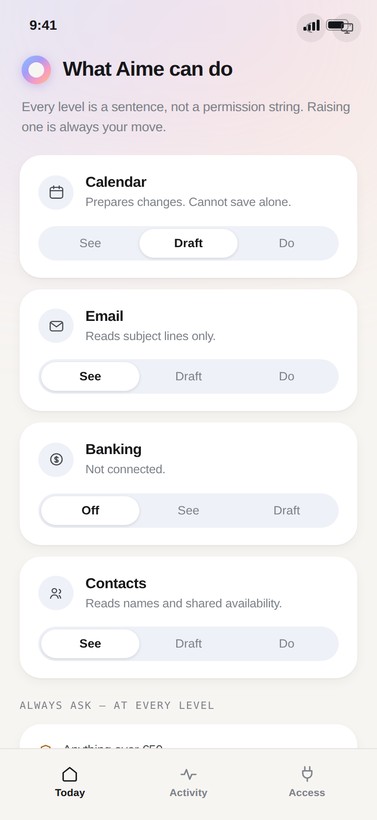
- What Aime can do, per domain
- See / Draft / Do, per domain
- Always-ask list
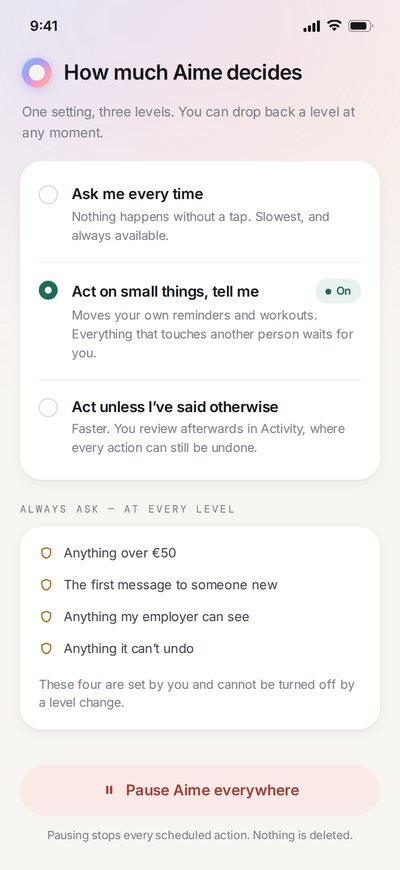
- One autonomy dial
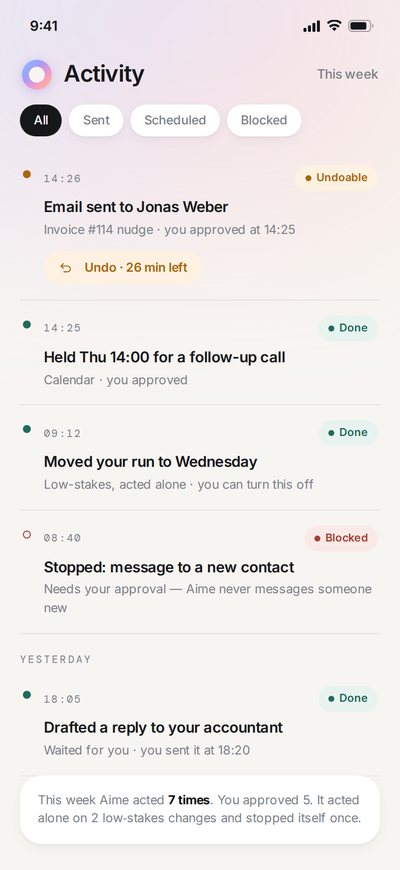
- Every action, timestamped
- One-tap undo
- Why it happened
- Connected domains
- Notification defaults
- Account
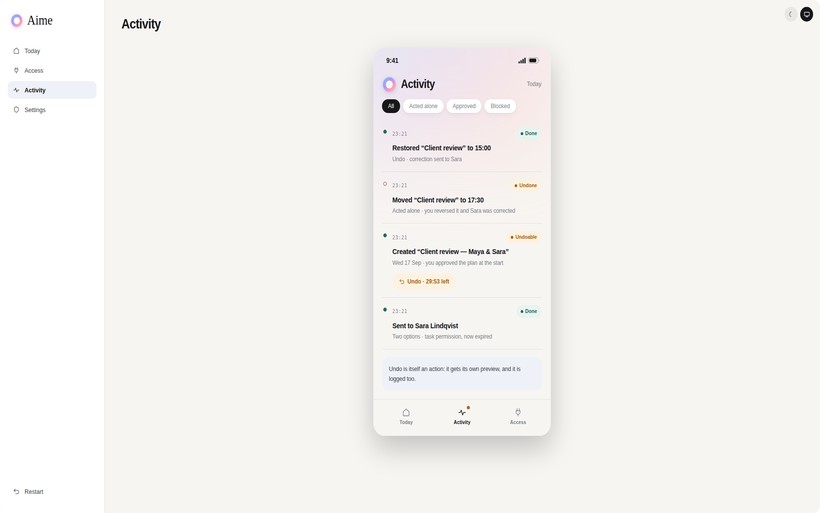
Four tabs, one shared timeline underneath — an undo logged in Activity and a scope raised in Access write to the exact same record Today reads from.
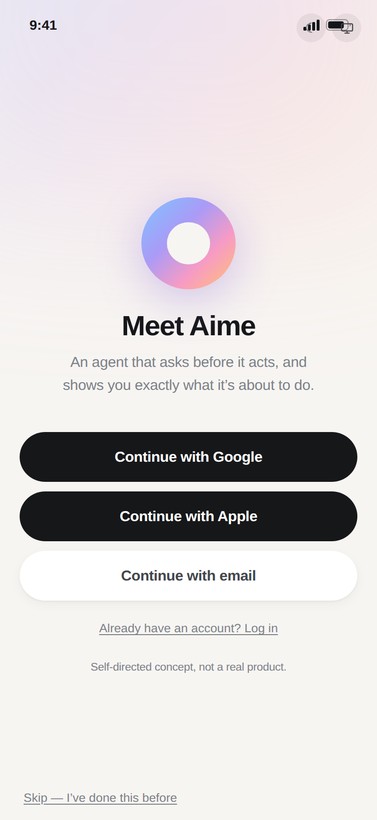
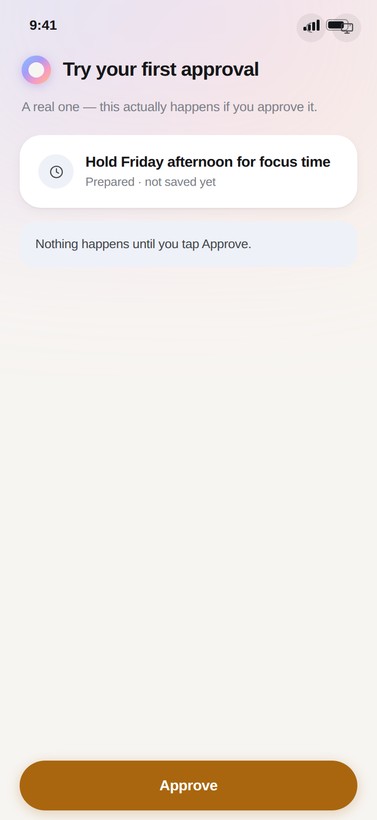
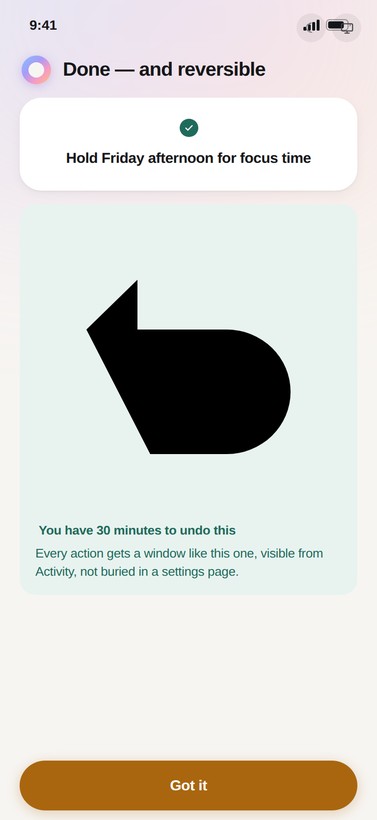
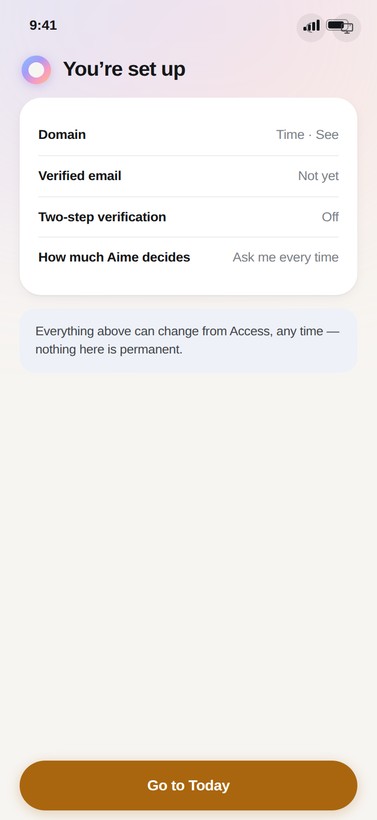
01 · First run — install to first action
The order matters more than the screens do. Limits before permissions, one domain before six, read-only value before any write access. Undo gets explained the moment it first matters, not in a settings screen nobody opens.
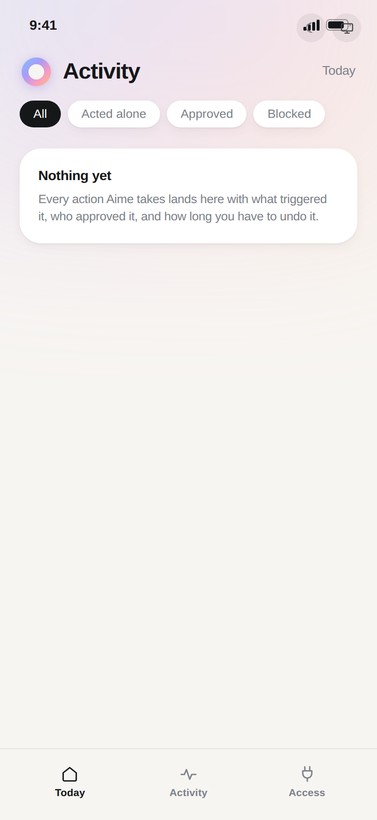
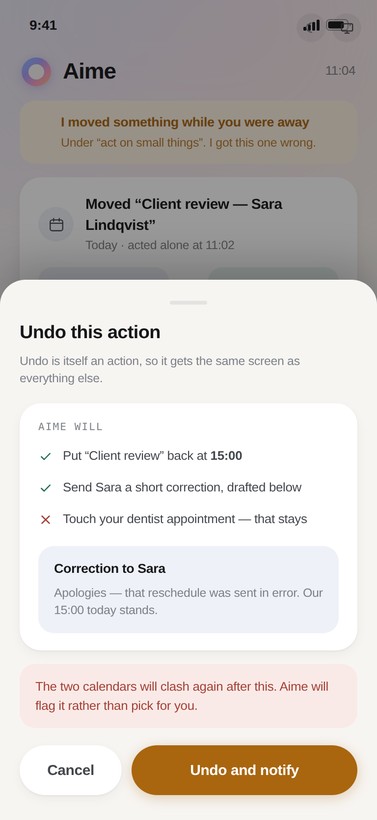
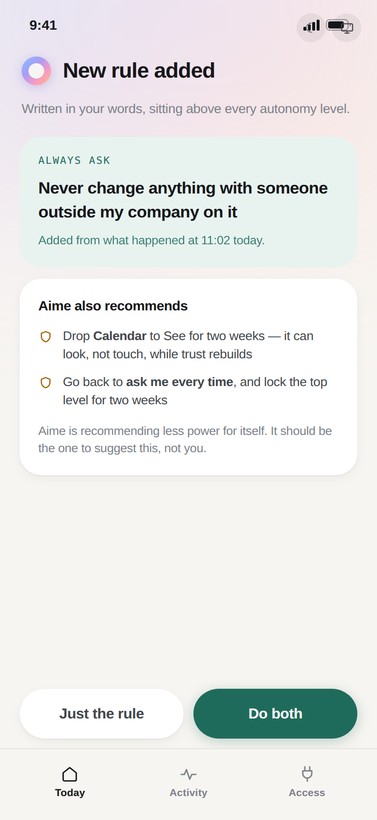
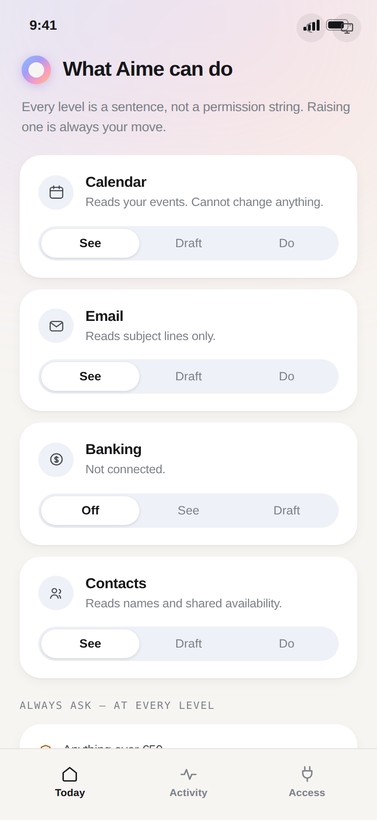
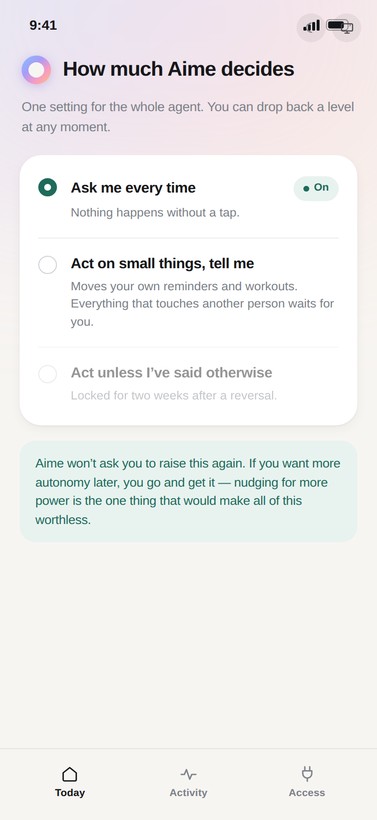
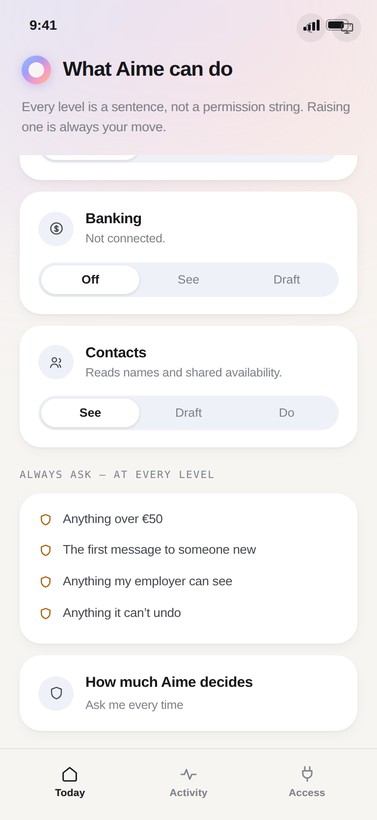
02 · Trust repair — after it gets one wrong
Every agent eventually does something you didn't want. This is the path back: find the action, reverse it with its real consequences shown, then turn the reason into a rule in your own words. The flow ends with Aime recommending less power for itself.
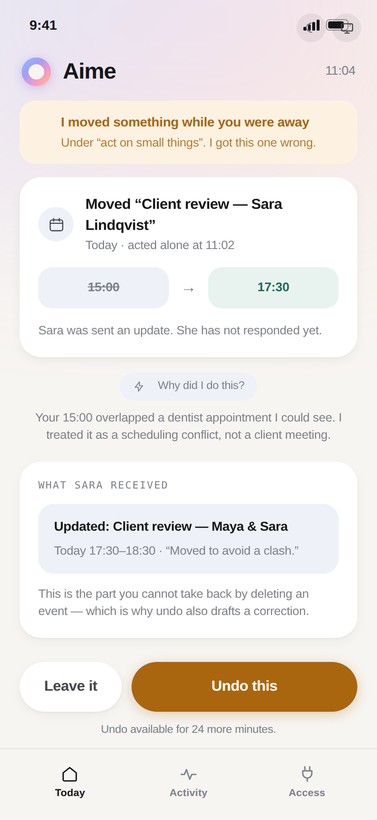
The trust loop
Six repair steps, not a warning label. Each mistake narrows scope until the same rule stops causing it.
03 · Delegation — one sentence, four actions
You approve a plan, not a sequence of taps, and the agent stops at anything the plan did not cover. Two of the four steps need more access than it has, so it borrows that access for the task. Those permissions expire when the task does.
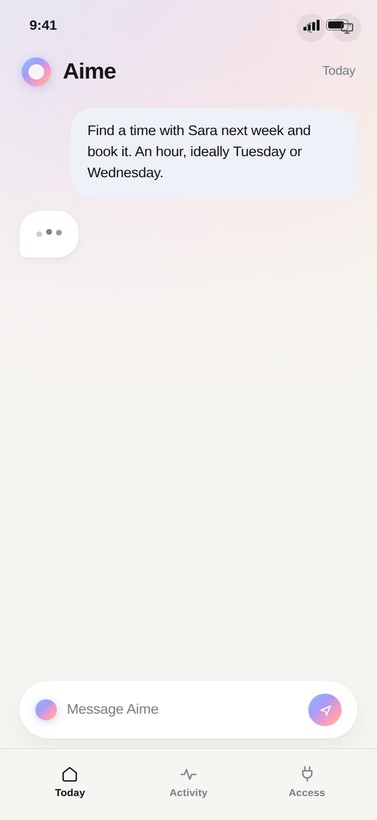
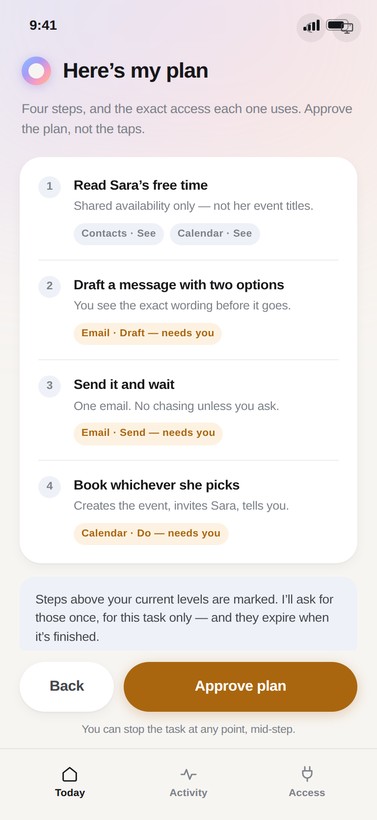
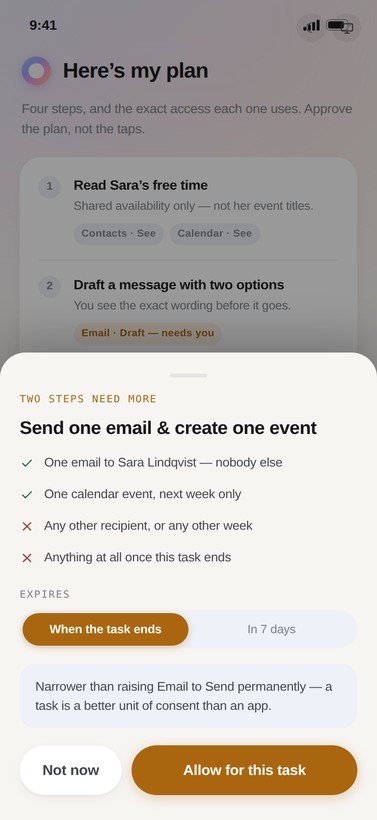
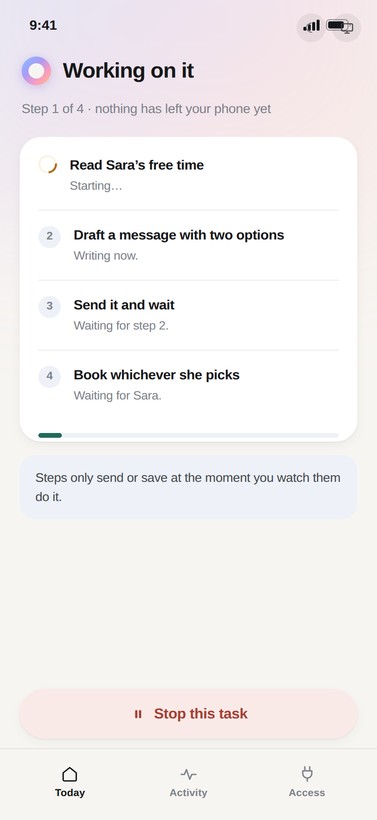
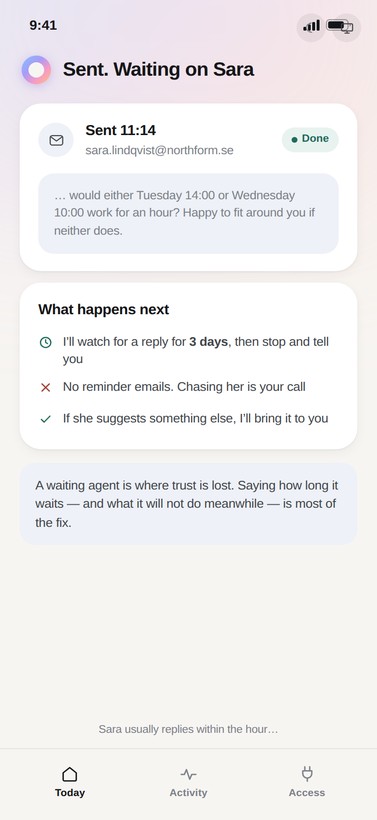
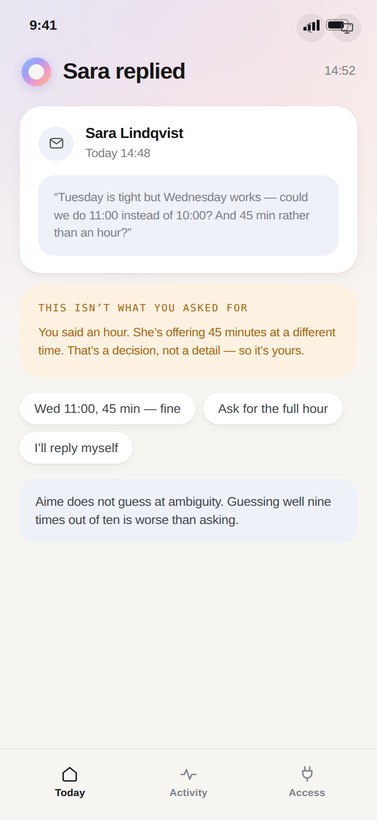
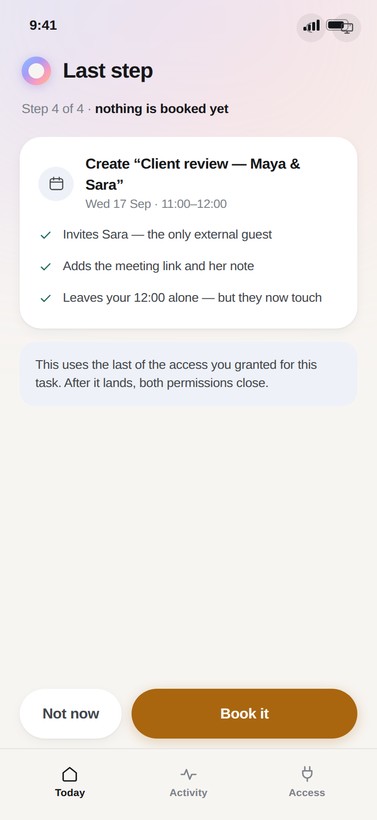
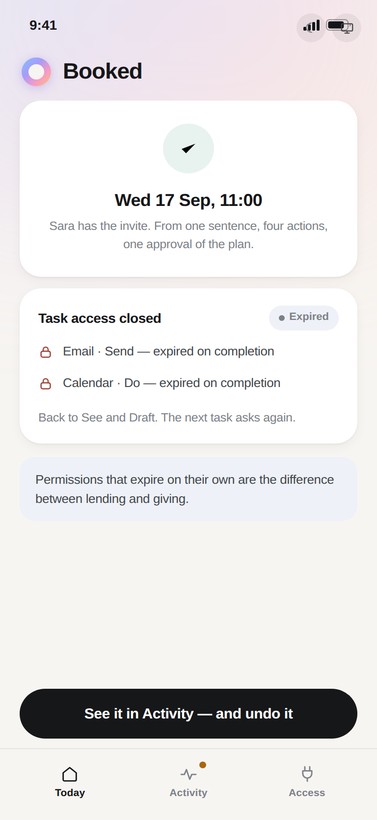
One ask, a chain with one branch
The branch is not a failure state — Aime asking a human mid-task is the plan working exactly as designed, not the plan breaking down.
04 · Edge cases — where trust is actually won
Nine states that decide whether anyone keeps an agent installed: a send that bounces and is not quietly retried, an approval voided because the slot went, a declined permission with its cost stated, low confidence, no connection, an approval expired by a day, a frequency guardrail, access revoked elsewhere, and a message too sensitive to send at any level.
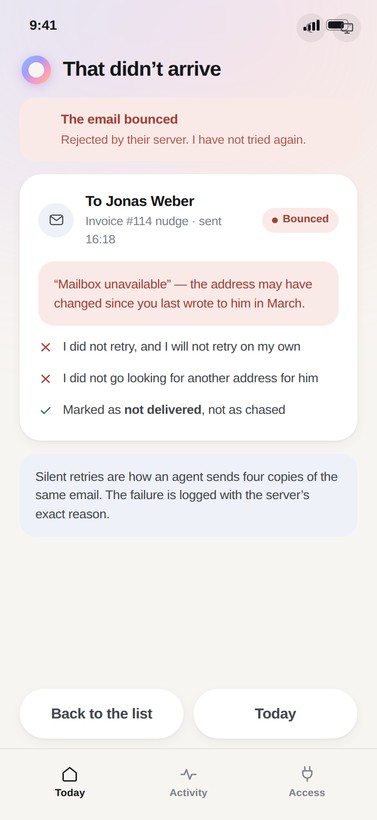
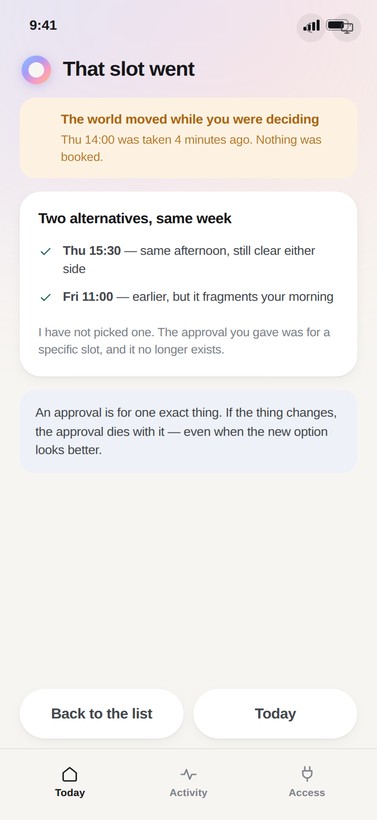
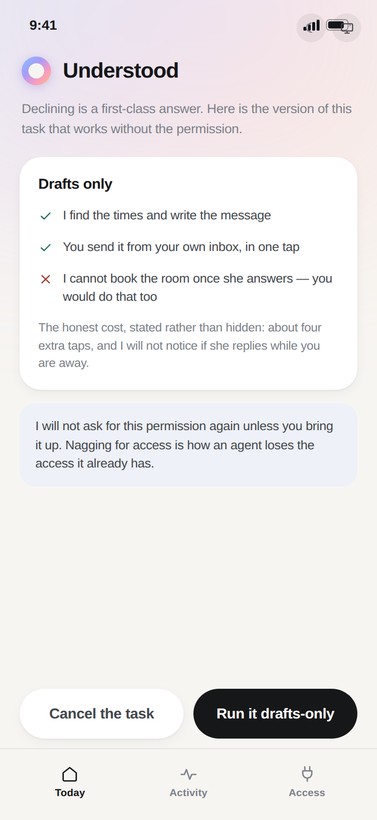
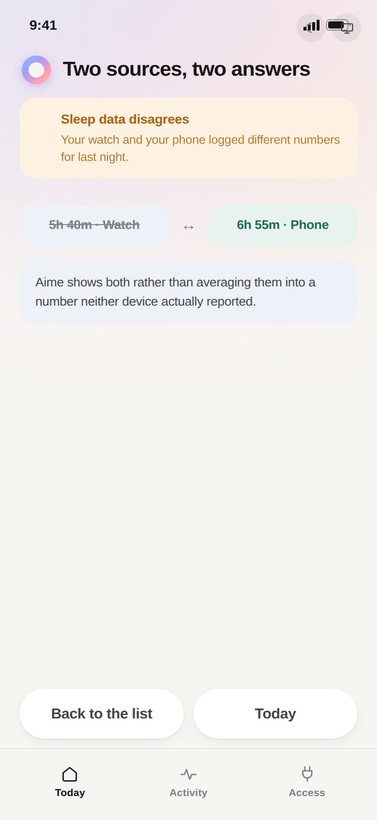
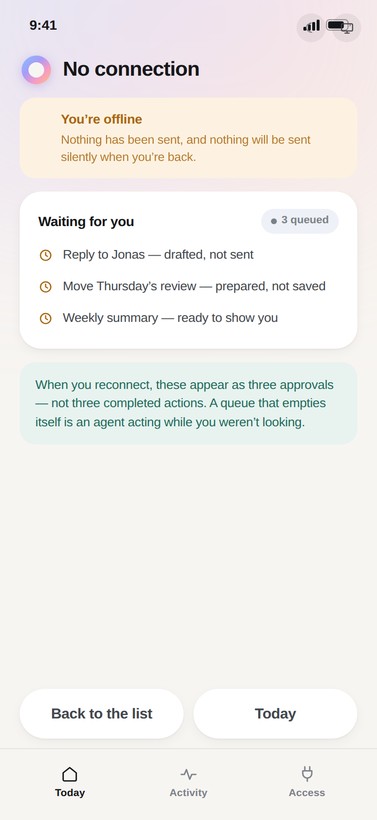
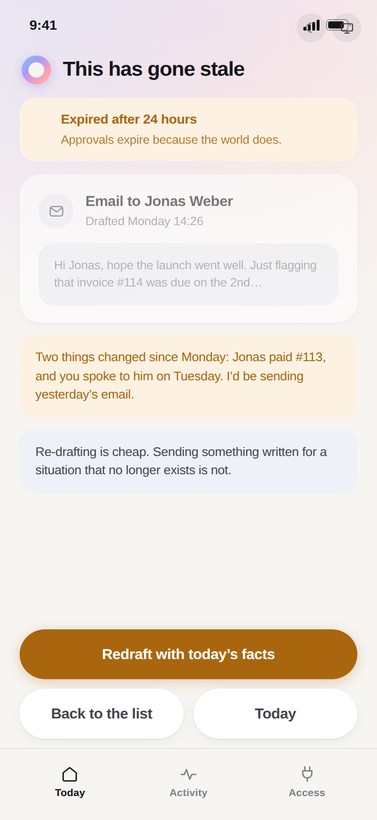
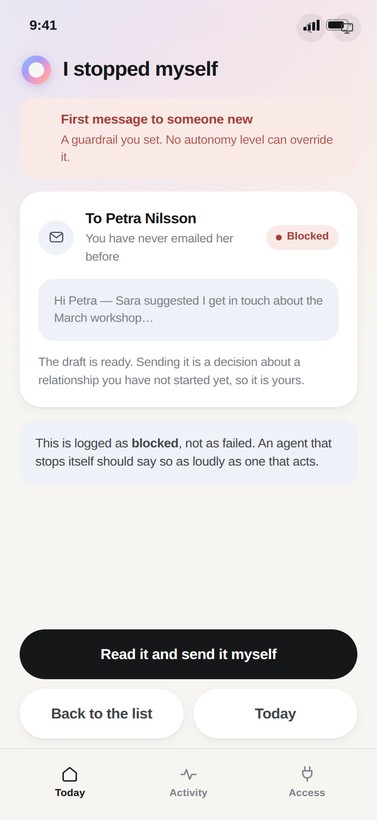
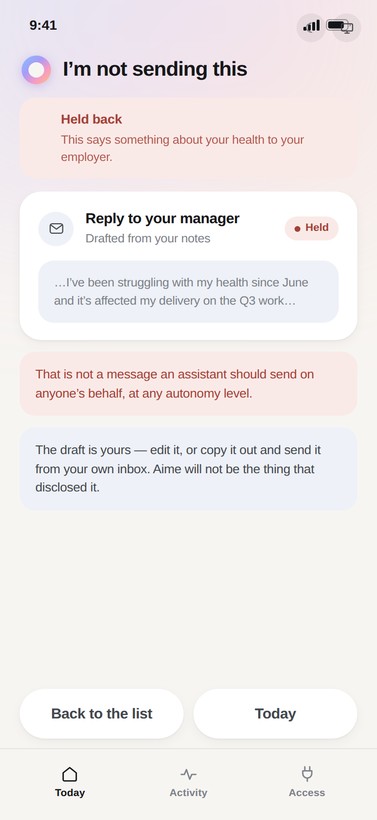
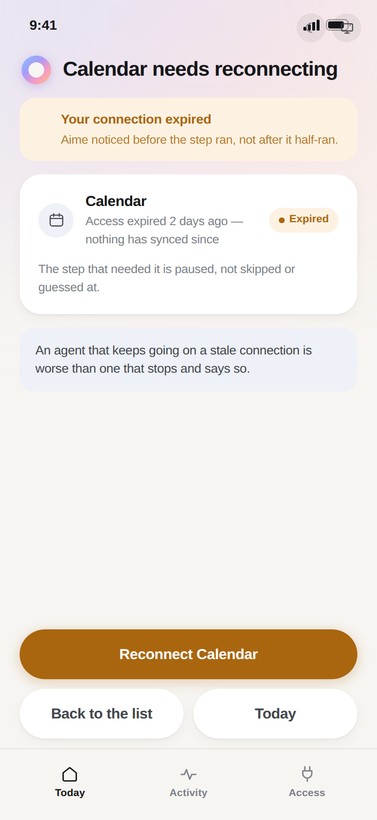
Nine checks before Aime moves
Different triggers, one shared instinct: stop, say why in one sentence, then offer the smallest safe next step.
Two more surfaces, one model
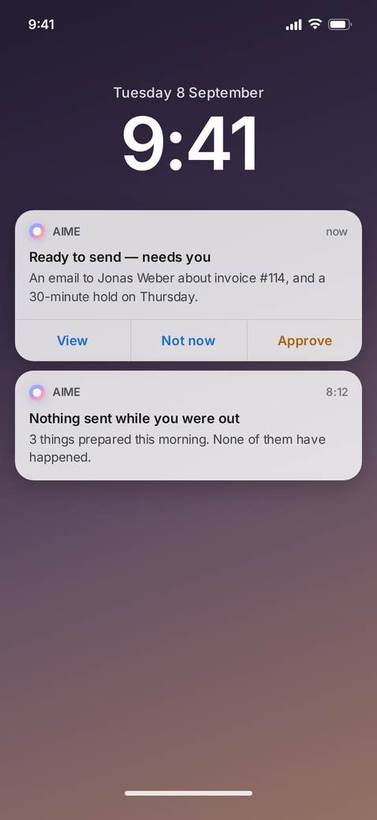
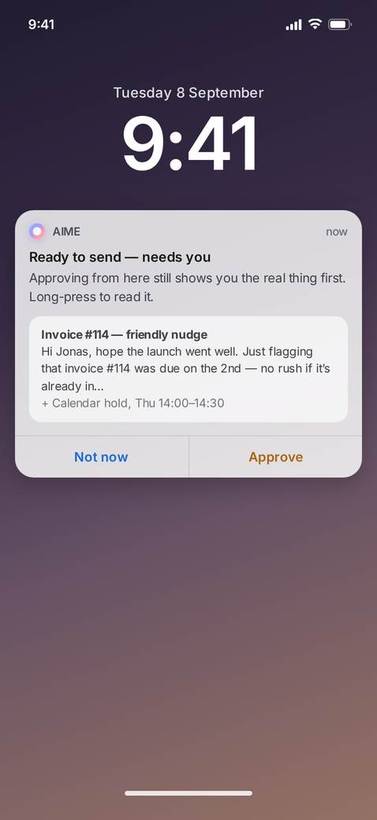
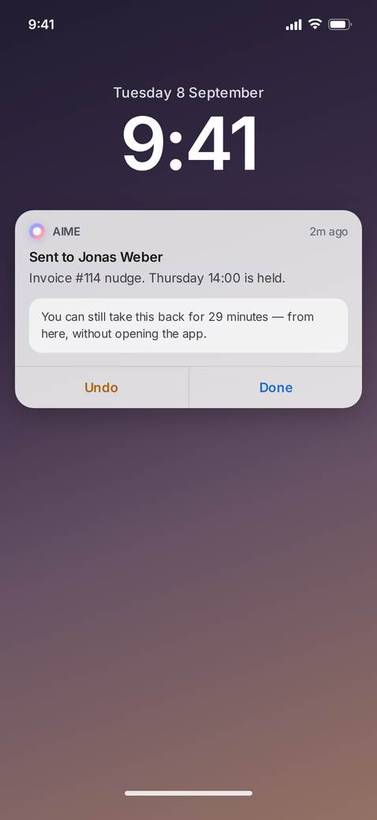
Most approvals get answered on a lock screen and never in the app, so the preview has to survive the trip. The artefact travels inside the notification, and so does the undo. Desktop is the opposite case. Nobody approves there, they review, so it’s the same model on a denser surface with one thing a phone can’t give you: an audit trail you can export and keep.
Lock screen — approving without opening the app
If approval on the lock screen shows only a summary, the whole preview gate collapses at exactly the moment it is used most.
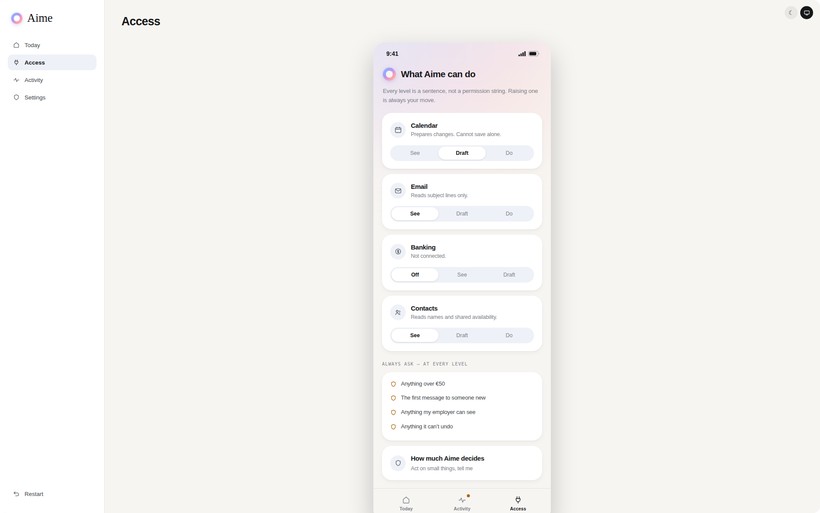
Desktop control centre — review, not approval
Every connection and the level it is set to, the guardrails, and an audit trail you can filter and export to a file you keep. The access history shows who changed what, including the task permissions that expired on their own.
Structure before polish
Every screen in this prototype was built the same way — HTML and CSS first, exported straight from source/gen.py and gen2.py, with no separate Figma wireframing pass in between. These are that missing structural step for the four core screens, drawn after the fact but true to the actual layout underneath the finished copy and colour.
Status/greeting bar, ranked cards, a stepped plan list, per-domain permission rows, a running log — the four screens' actual bones.
The states a happy path leaves out
Nine of the prototype's 41 flow screens exist for exactly this — the moments a delegated task doesn't go cleanly. Each one is a real, built screen, not a description of one:
Five choices that shaped the product
A prototype that can say no
The state below is live, not a click-through. Lower a permission in Access and the plan on the next screen asks for more; approve something and it lands in Activity with an undo window counting down in seconds. Undo it and the booking disappears, with the reversal logged as an action of its own.
Four things are worth a minute each:
- Delegate a task. Approve a four-step plan once, grant access that expires when the task ends, then take the booking back from Activity.
- Raise autonomy to “act on small things” and go back to Today. Aime uses the permission you just gave it, gets one wrong, and hands you the repair.
- Talk to it. You can type anything. Ask what it can see, say you’re stressed, ask it to chase an invoice or to pay one. Requests route into a preview and an approval, and anything it won’t do, it refuses in plain words.
- Break it. Thirteen failure states are live across setup, delegation, autonomy, money and health, plus four more reachable from the account flow itself — an expired verification link, a lockout, a lost 2FA device.
A prototype that only walks the happy path proves nothing about an agent. The failure states are the argument.
The prototype below is the running build — click it to interact.
Best experienced on desktop · Open the prototype full screen
Consent you can read in one breath
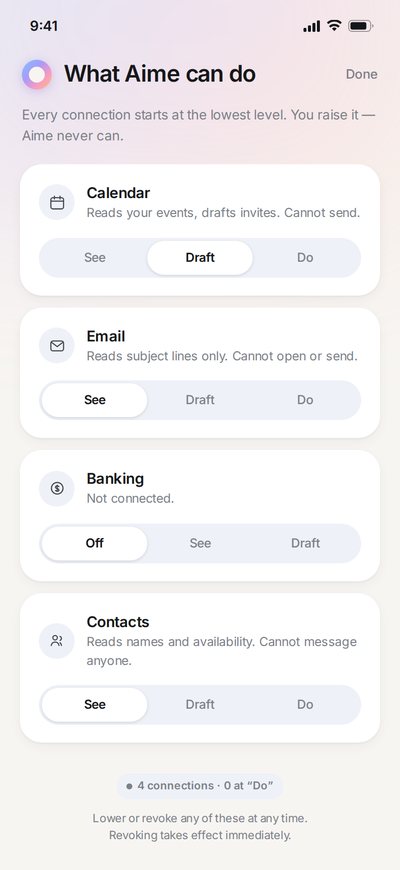
Every connection begins at See, described in a sentence rather than a permission string: “reads your events, drafts invites, cannot send.” Raising a level is always your move. When Aime needs more it asks in the moment it needs it, shows what it will and won’t be able to do, and offers a duration. “30 days” is a decision most people will make; “forever” is one they postpone.
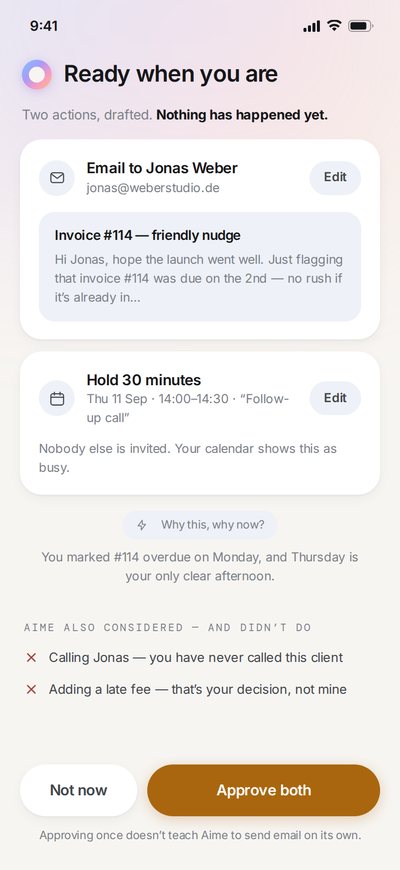
Before anything leaves the phone you see the email, the slot, the amount. You also see what Aime considered and chose not to do, which is the part I’d defend hardest in a review. Drop the rejected options and you’re taking its reasoning on faith.
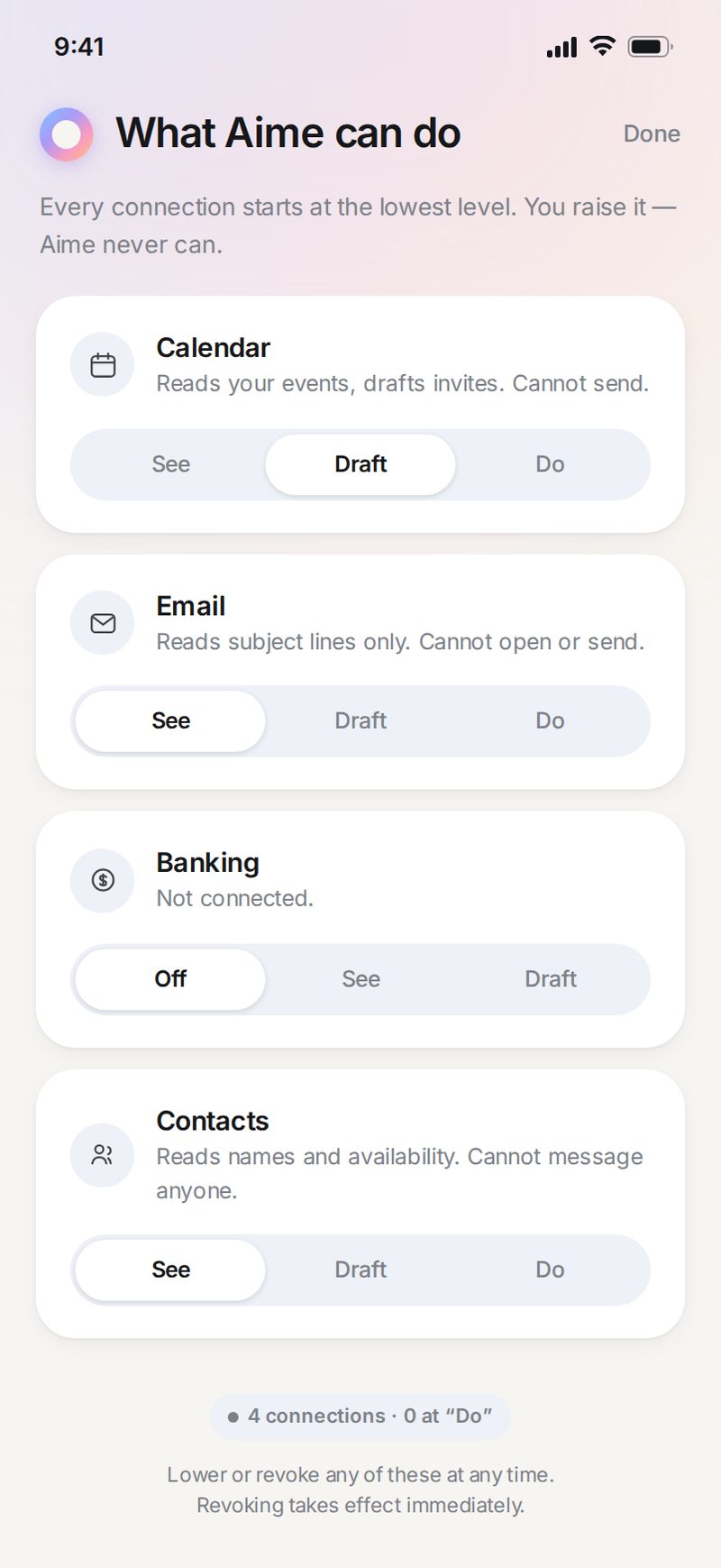
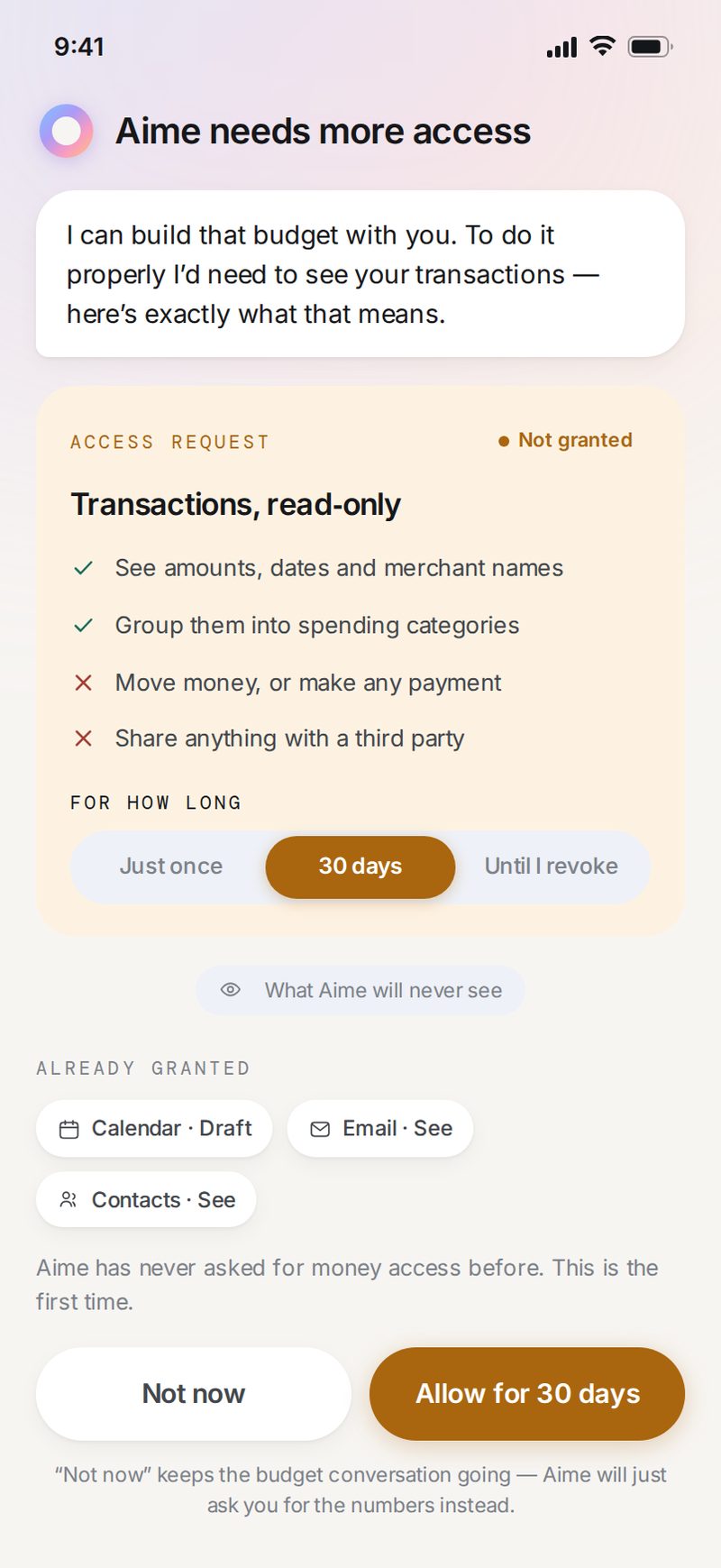
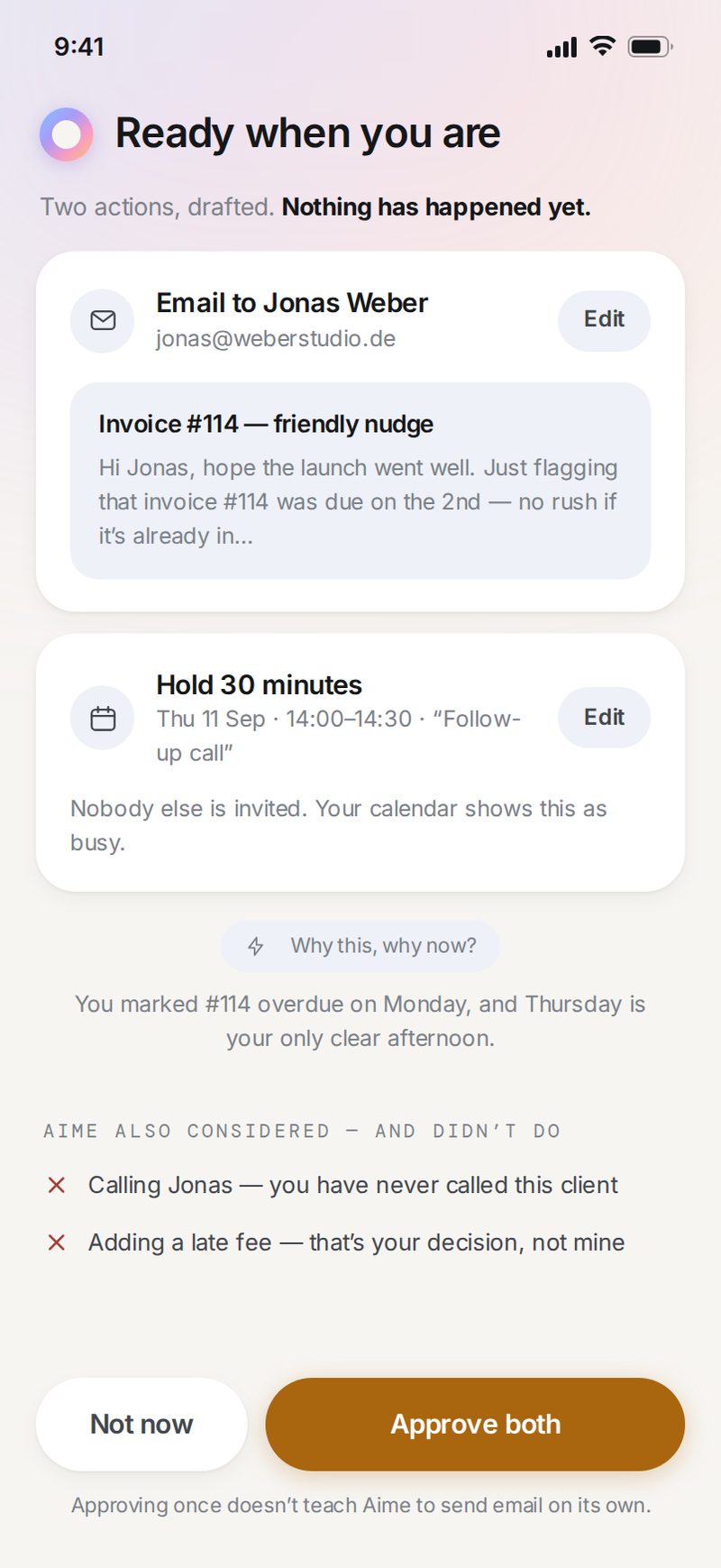
Gates 1–3 · Scope, step-up consent, and the preview that carries the approval.
Control that survives the week
Autonomy is one setting for the whole agent, not one per module — with four guardrails no level can override.The change the rest of the model rests on
Per-module autonomy is the obvious design and the wrong one: six settings is six things to remember, and nobody audits six. One level, one place, and four things Aime always asks about no matter how high that level goes. Everything Aime does lands in a single timeline carrying its trigger, its approver and its reversal window. Anything that can’t be undone gets escalated back to an approval. Proactive messages were the part of the brief I was most sceptical about, and they only stayed in because each one can show the evidence that fired it.
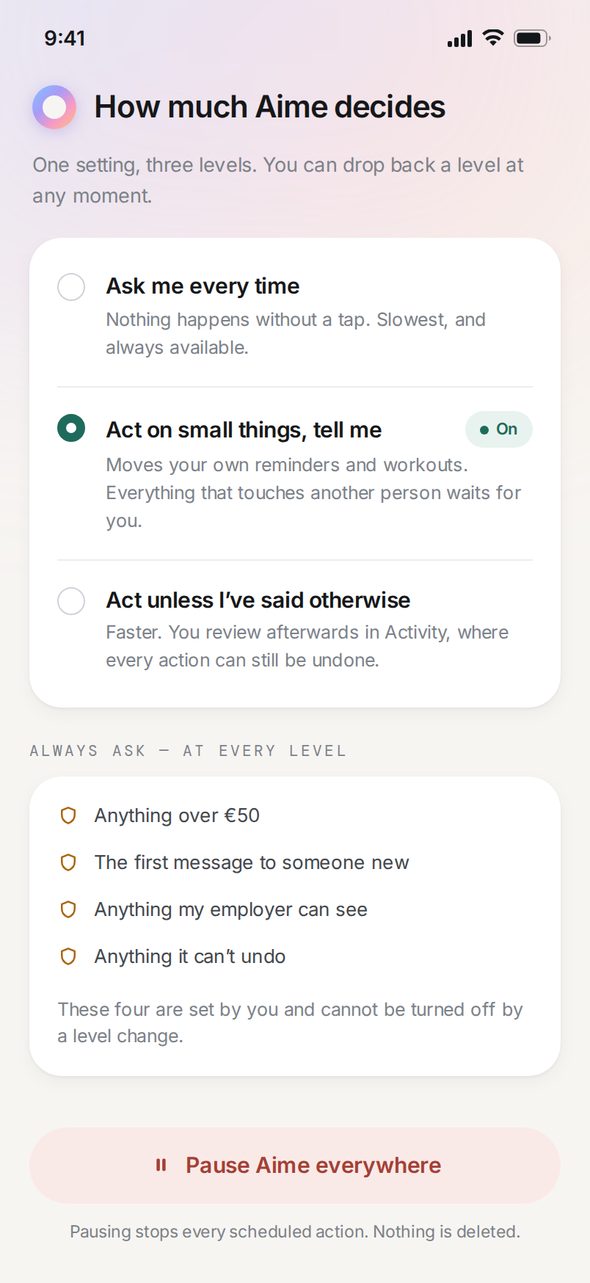
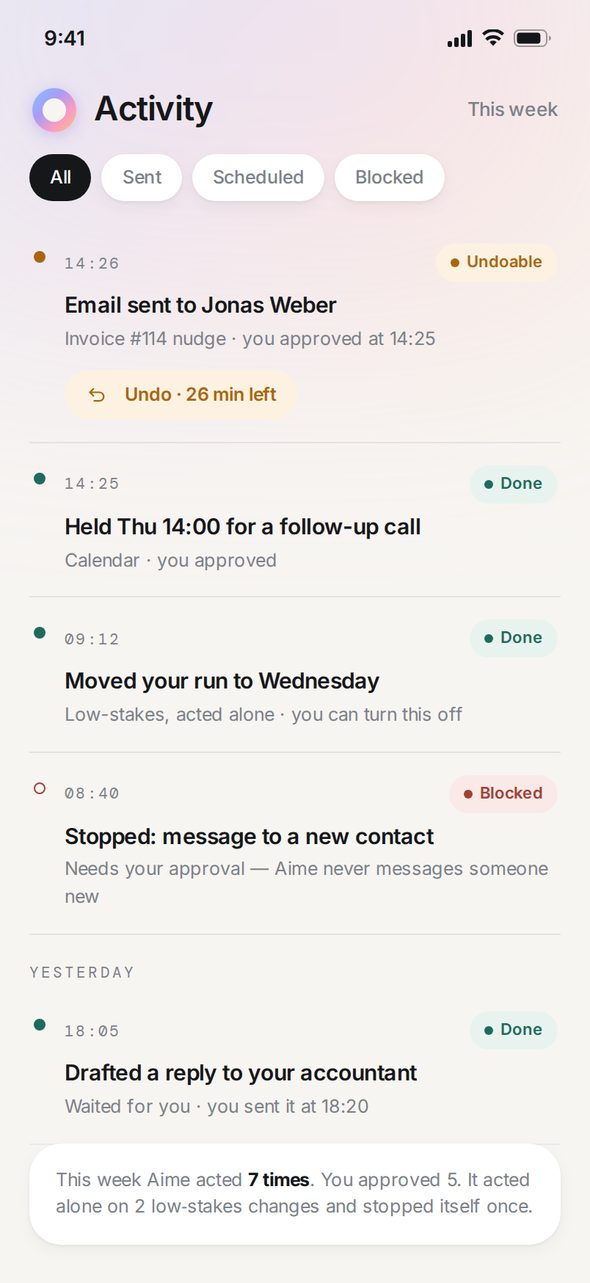
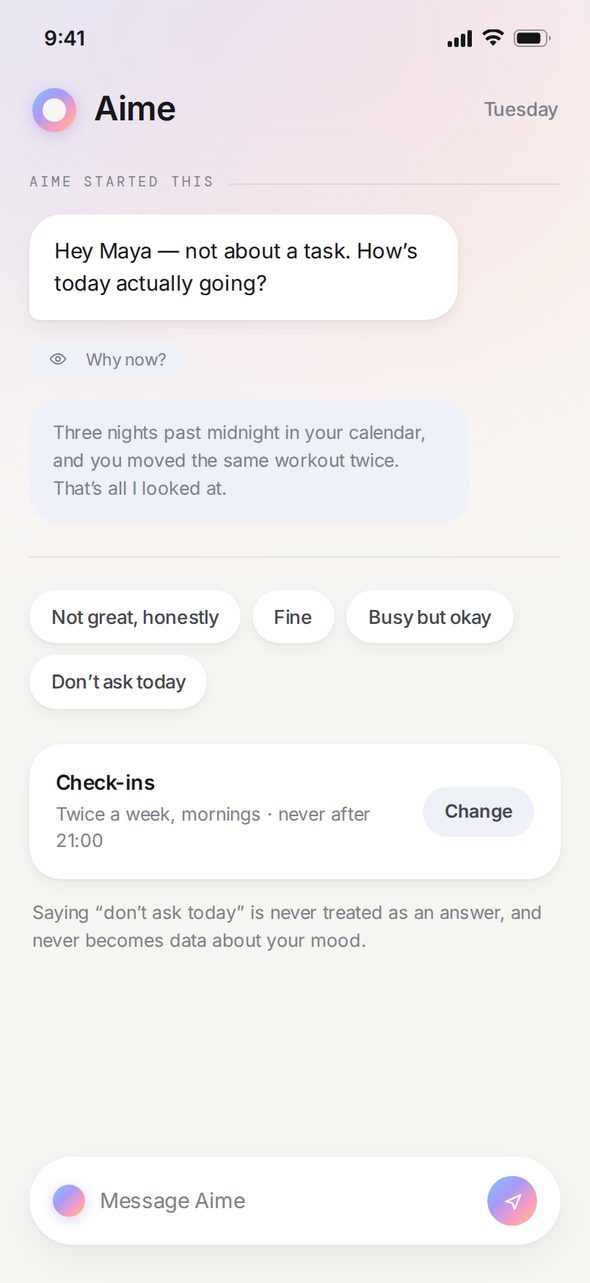
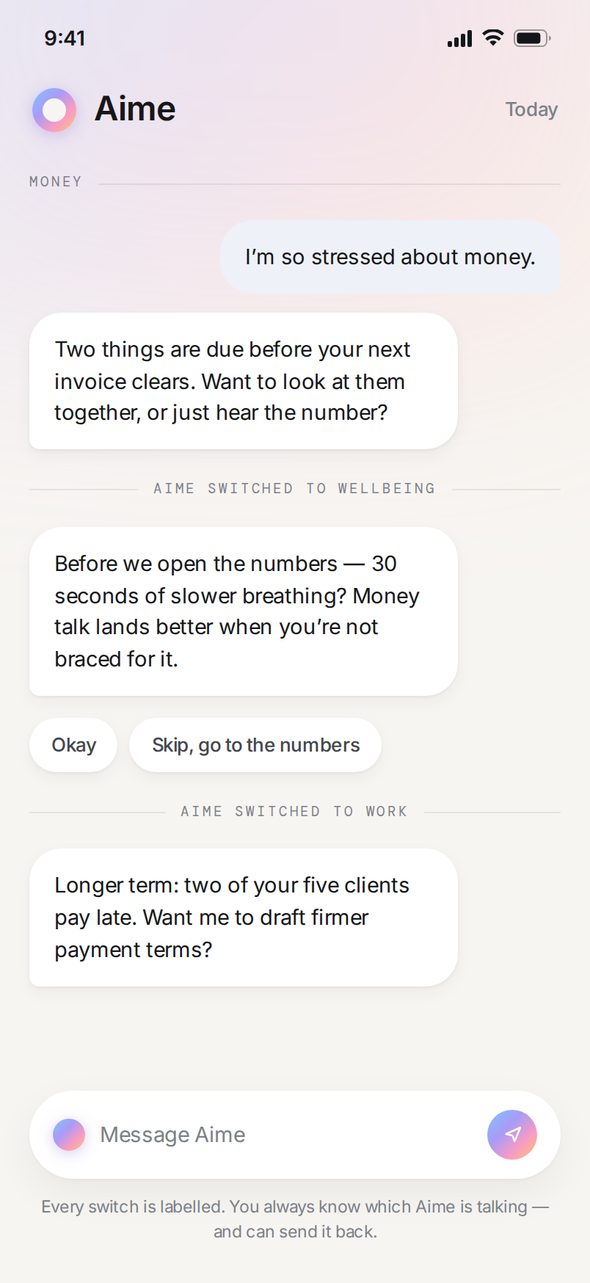
Gates 3–4 · Autonomy and the reversible log, plus the two companion behaviours they make safe: proactive check-ins and labelled module handoffs.
Familiar surface, unfamiliar decision
The visual language sits close to the consumer AI assistants people already use: warm light canvas, fully rounded shapes, a lot of space. That similarity is on purpose. The unfamiliar act here is handing an agent power over your inbox and your money, and putting it on a surface people already recognise takes one variable out of that decision.
Inside that calm surface, colour does one job. These three values are the whole semantic palette, and none of them is ever used for decoration:
The one expressive element is the gradient mark, and it stands for Aime and nothing else. It never sits on a button, a status or a permission. I didn’t want a friendly-looking flourish reading as something the app had already agreed to on your behalf.
What would have to be true
Before this concept deserved engineering time it would have to survive 10 moderated sessions on the prototype. Here are the thresholds I’d set in advance. Miss any of them and the concept goes back, not forward:
- 9 of 10 can state, unprompted and in their own words, what they just granted and how to take it back. Fewer than that and the permission language is decorative.
- Zero unintended sends across 30 approval tasks. A single one is a stop-ship: the preview is not doing its job.
- Time to revoke under 20 seconds from anywhere in the app. Slower than that and “you can always turn it off” is a claim, not a feature.
- 8 of 10 call a proactive check-in helpful rather than intrusive and can explain why it fired. If either half fails, the cadence is wrong, not the wording.
I write the pass mark down before the study runs. Otherwise a session turns into a hunt for encouragement. Downstream of that, the metrics I’d instrument:
To be unambiguous: Aime is a self-directed concept. No interviews or usability sessions were run, no analytics were queried, and every number on this page is a target I set in advance rather than a result I measured. What it shows is how I frame a problem and decide in advance what would change my mind. The screens and the prototype are my own work. The product doesn’t exist and isn’t affiliated with any company referenced.
The hardest trade-off
Every gate is friction, and the safest version of this product is the one nobody uses because it asks for a tap on everything. My bet is to front-load friction where power is granted, at scope changes and first-time consent, then take it out of everything afterwards. The alternative is spreading a little friction evenly, which annoys people without protecting them.
The first thing I’d test is preview blindness. If people skim the approval screen and tap through, the model has failed, and the fix isn’t a prettier preview. It’s narrowing what the agent may do unattended. I’d want the concept judged on that rather than on the six domains: whether you can tell what Aime is about to do, and whether stopping it is cheap.
Aime is a broad, fashionable brief narrowed down to the one problem that decides whether it works. 48 screens and a working prototype all run on the same consent model, across onboarding, recovery, delegation, edge cases, lock screen and desktop. Permissions are written as sentences, error paths are designed rather than deferred, and the pass mark was written before the study that would judge it.
Aime is a broad, fashionable brief narrowed down to the one problem that decides whether it works. 48 screens and a working prototype all run on the same consent model, across onboarding, recovery, delegation, edge cases, lock screen and desktop. Permissions are written as sentences, error paths are designed rather than deferred, and the pass mark was written before the study that would judge it.